The Buzz is back up?

Just saw your javascript excerpt. I keep abreast of the page source situation.

I'll play with it this evening and give you what I come up with. Here or at your email? I'm "out the door" in a moment and for a while.

Glen
 
But one other thing first...

Is it possible with this software to have one post table run wide and not drag all the others with it? I've seen that work properly elsewhere, I believe (don't remember where or what the software was).

I'll email you later...

Glen
 
[ QUOTE ]
Rest assured I'd still be on the soapbox about this even if I had broadband available. It's an ethical thing for me.

[/ QUOTE ]

Haha, that's funny. But I can't understand why people post huge pics...
 
Colin,

Tried to change my avatar in a wider one (5,63kB), but this was the reply:

[ QUOTE ]
We cannot proceed.
It does not appear that this was submitted from the proper form.

Please use your back button to return to the previous page.

[/ QUOTE ]
 
Wolter,

You may have to force a refresh of the page to see the new image. I just changed from the freebsd mascot avatar to the stihl chainsaw image from the advert here. When I looked at my options page again (why does submitting the form kick me back to my preferred site-entry page instead of back to my options page, Colin?) it showed the mascot stretched to the new maximum width. After I forced a reload of the page the chainsaw appeared.

Glen
 
Colin,

On the subject of the document.write code, my attention was initially drawn to (diff output of the snippet saved as a file and the correction):
<font class="small">Code:</font><hr /><pre>1c1
&lt; &lt;script language="Javascript"&gt;
---
&gt; &lt;script type="text/javascript"&gt;
11c11
&lt; --&gt;
---
&gt; //--&gt;</pre><hr />

Try this (note the {$ubbt_lang['QUICK_REPLY']} sections now match the original (working) snippet, which having not previously matched may be where the interpreter was choking):
<font class="small">Code:</font><hr /><pre>&lt;script type="text/javascript"&gt;
&lt;!--
document.write("
&lt;td class=\"navigation\" nowrap=\"nowrap\" $quickdisplay&gt;
&lt;a href=\"javascript:void(0)\" onClick=\"javascript:quickReply($i);\"&gt;
&lt;img src=\"{$config['images']}/reply.gif\" border=\"0\"
alt=\"{$ubbt_lang['QUICK_REPLY']}\" width=\"21\"
height=\"14\" $imagestyle /&gt;
{$ubbt_lang['QUICK_REPLY']}
&lt;/a&gt;
&amp;nbsp;
&lt;/td&gt;");
//--&gt;
&lt;/script&gt;</pre><hr />

See (though it shouldn't pertain in this case, it's good to know) http://ln.hixie.ch/?start=1091626816&amp;count=1

Glen
 
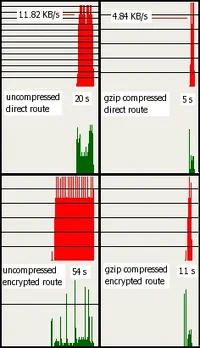
Here's a possibly interesting little bit of data I gathered to show the effects of having the server send compressed HTML pages to "browsers" which can use it that way. This difference (as shown between the two bottom graphs in the attached image) should be noticeable to everyone, even on a broadband connection.

I use a little window in the corner of my screen which performs the function of a strip chart tracking my incoming and outgoing data traffic/rates over the interface to the Internet (modem in this case). The outgoing data is on the bottom in green, and the incoming is on the top in red.

The chart initially indicates 0 - 1 KB/s data rate in the vertical scale, but dynamically scales as needed. Whenever any 1 KB/s increment is exceeded, it draws a horizontal line and adds another 1 KB/s. You'll see what I'm talking about in the attached image.

Each individual vertical line is a 1 second interval. The window was randomly sized, but as it so happens, it represent 118 seconds of traffic.

The attached image is a composite of four times fetching this very thread late last night while the traffic and page were both stable. The document fetched was the entire thread on one page, and it only includes the HTML data itself, none of the images.

The page at the time was 222060 bytes in size.

One thing that will be shown is that when dealing with plain text, my modem and the one at the ISP do a moderately fair job compressing/uncompressing the data for transmission. I'm unsure, but don't believe that cable modems do that. At any rate, the raw throughput over the phone line for my (nominal) 56k dialup connection is about 4.8 KB/s. Since the plain text was compressed by the the ISP modem and uncompressed by mine, the effective transfer rate was 11.8 KB/s.

The transfer rates included on the two upper graphs is that as reported by the program which fetched the page. The spikes above that rate in the charts indicate the overhead required for the transfer mechanism (the data packets are encapsulated).

The number of seconds as recorded in the graphs is the whole number reported. I'm sure there was some rounding involved.

I could not pull the data transfer rates from the fetching program for the two lower charts because it falsely claims 5.6 MB/s since it is receiving all the data in one quick chunk from the proxy stuff I'm using. But you can see that it matches the upper right in terms of throughput.

One other thing, at the risk of being tediously tedious: compressed data, such as (GIF, PNG, JPEG) images cannot be compressed/uncompressed by the modems. This includes the data as I usually get it, encrypted (which does not compress well due to randomness) via the outward-facing proxy I use, freely available from http://tor.eff.org/ (check it out!). I understand from friends with high-speed connections that tor can drastically decrease their connectivity throughput, but I notice only the increased latency due to bouncing to three places around the globe.

Browsing this site using tor was a performance hit for me. However, as you'll note in the charts, Colin having switched on the compressed output has brought it back to usability.

You should all have noticed this too, if you're using a modern browser which accepts compressed text.

Enjoy.

Glen

 

Attachments

  • 25924-all.webp
    25924-all.webp
    10 KB · Views: 10
[ QUOTE ]
Try this (note the {$ubbt_lang['QUICK_REPLY']} sections now match the original (working) snippet, which having not previously matched may be where the interpreter was choking):
<font class="small">Code:</font><hr /><pre>&lt;script type="text/javascript"&gt;
&lt;!--
document.write("
&lt;td class=\"navigation\" nowrap=\"nowrap\" $quickdisplay&gt;
&lt;a href=\"javascript:void(0)\" onClick=\"javascript:quickReply($i);\"&gt;
&lt;img src=\"{$config['images']}/reply.gif\" border=\"0\"
alt=\"{$ubbt_lang['QUICK_REPLY']}\" width=\"21\"
height=\"14\" $imagestyle /&gt;
{$ubbt_lang['QUICK_REPLY']}
&lt;/a&gt;
&amp;nbsp;
&lt;/td&gt;");
//--&gt;
&lt;/script&gt;</pre><hr />

[/ QUOTE ]
As I mentioned in my email last night, I can't drop this in anywhere and try it myself in any meaningful way.

If the above doesn't work, the next thing I'd try would be to double up on the escapes in the event the interpreter uses them itself, hence, discards them from the output. Or triple-up, etc., depending upon the number of iterations the code encounters.

You'd said that you'd played with the escaping, but didn't say how. I hope this isn't ground you already covered. :)

Glen
 
[ QUOTE ]
Here's a possibly interesting little bit of data I gathered to show the effects of having the server send compressed HTML pages to "browsers" which can use it that way. This difference (as shown between the two bottom graphs in the attached image) should be noticeable to everyone, even on a broadband connection.

[yada yada yada]

You should all have noticed this too, if you're using a modern browser which accepts compressed text.

[/ QUOTE ]
Let me bale that hay this way: if you have a broadband connection, you'd see the comparison between the server-compressed pages and uncompressed pages in keeping with the bottom two charts, though the rates would be higher and times would certainly be lower for you.

The uncompressed page from the server was 222329 bytes and the compressed-on-the-server page was 22212 bytes; for roughly 1/10 the data being sent.

My charts don't compare directly between the top two and bottom two because my modem connection cheats a little on the plain text (resulting in only a 4:1 ratio), but the bottom two are unequivocal at about 5:1.

My ISP offers a dialup web accelerator service for a nominal extra charge. They claim "up to 5 times faster". Got any ideas about what it is they're doing? :) They're not very smart, are they? It would really only be 4 times faster in practice, as you can see for yourself. And it would only approach that if there were no uncompressed-format images involved.

What boggles my mind is why they don't offer it for the broadband connections, where the difference would actually be more dramatic...
 
Colin thanks for the offer, but Glen proposed a page refresh after uploading, and you know what???? It worked.

So Glen, you too, lets drink a beer tonight and celebrate that you both make it happen on the buzzboard. /forum/images/graemlins/beerchug.gif /forum/images/graemlins/friday.gif /forum/images/graemlins/beerchug.gif

Wolter
 
Colin,

The script above will not work unless you escape the line ends. Then it does (at least if)

<font class="small">Code:</font><hr /><pre>&lt;script type="text/javascript"&gt;
&lt;!--
document.write("\
&lt;td class=\"navigation\" nowrap=\"nowrap\" $quickdisplay&gt;\
&lt;a href=\"javascript:void(0)\" onClick=\"javascript:quickReply($i);\"&gt;\
&lt;img src=\"{$config['images']}/reply.gif\" border=\"0\"\
alt=\"{$ubbt_lang['QUICK_REPLY']}\" width=\"21\"\
height=\"14\" $imagestyle /&gt;\
{$ubbt_lang['QUICK_REPLY']}\
&lt;/a&gt;\
&amp;nbsp;\
&lt;/td&gt;");
//--&gt;
&lt;/script&gt;</pre><hr />
produces

<font class="small">Code:</font><hr /><pre>&lt;script type="text/javascript"&gt;
&lt;!--
document.write("\
&lt;td class=\"navigation\" nowrap=\"nowrap\" &gt;\
&lt;a href=\"javascript:void(0)\" onClick=\"javascript:quickReply(0);\"&gt;\
&lt;img src=\"images/reply.gif\" border=\"0\"\
alt=\"Quick Reply\" width=\"21\"\
height=\"14\" style=\"vertical-align: text-top\" /&gt;\
Quick Reply\
&lt;/a&gt;\
&amp;nbsp;\
&lt;/td&gt;");
//--&gt;
&lt;/script&gt;</pre><hr />

Sorry about forgetting that earlier.

If you're going to implement this code, you might as well save a few bytes and change

<font class="small">Code:</font><hr /><pre>&lt;a href="javascript:void(0)" onClick="javascript:quickReply(0);"&gt;</pre><hr />
to

<font class="small">Code:</font><hr /><pre>&lt;a href="javascript:quickReply(0);"&gt;</pre><hr />

Glen
 
Hé guys,

On my buzzboard page all the little trees go leafless if I have read the new posts, except for one:

[ QUOTE ]
Training and Health
Discuss training regimens and diets for physical fitness, injuries and rehabilitation here.
10 207 (5) * Re: Shoulder (ChuckR) - 10/06/05 03:55 AM

[/ QUOTE ]

this one keeps telling me there are 5 new posts.

Is this just on my computer the case or is it a little bugger on all.

Wolter
 
Sorry to say, Wolter; I just went through and "caught up" in that forum, and, having "left" the site and returned (not logged out; just backed out of it and followed the link back in), that tree is now barren for me.

Sometimes there are new posts on page 1, as well as a page 2. If you only visit the posts on page 1 and leave the forum, it will still show new posts (because you haven't seen the rest) when you refresh the index page. Upon your next visit, or forced-reload of the index page, following the link to the thread should then take you to the second page. That is one of the things that I really like about this site software -- it accurately tracks which posts you've actually seen.

[Note that merely backing out of the forum to the index page again does not fetch the (updated) index page from the site unless you've set your browser to never cache pages. Traversing a site with your "back" and "forward" controls should not fetch new copies in any event. You should back all the way out and follow a link (or bookmark) in again to see the currentest version.]

I understood what I was saying; I hope it was a little clearer than mud for you...

Glen
 
[ QUOTE ]
Sorry to say, Wolter; I just went through and "caught up" in that forum, and, having "left" the site and returned (not logged out; just backed out of it and followed the link back in), that tree is now barren for me.

[/ QUOTE ]

Yes glen, when I am on treebuzz the tree gets leafless, but after logging out and closing the computer, starting up the computer and logging in there are 5 (after your post, 6) new posts again

[ QUOTE ]
Sometimes there are new posts on page 1, as well as a page 2. If you only visit the posts on page 1 and leave the forum, it will still show new posts (because you haven't seen the rest) when you refresh the index page. Upon your next visit, or forced-reload of the index page, following the link to the thread should then take you to the second page. That is one of the things that I really like about this site software -- it accurately tracks which posts you've actually seen.

[/ QUOTE ]
No, no new posts or pages that I have not seen.

[ QUOTE ]
I understood what I was saying; I hope it was a little clearer than mud for you...

[/ QUOTE ]
Yep it is :-), but the bug remains. It's only on this thread that the "not read posts" keep appearing.

Wolter
 
[ QUOTE ]
after logging out and closing the computer, starting up the computer and logging in there are 5 (after your post, 6) new posts again

[/ QUOTE ]

I forget just how drastic the effect is, but you might try the "My Home" link, then have a look at the "My Cookies" link there, and maybe "expire" yours. (I've heard that Microsoft will be doing away with the "My whatever" theme in their new Windows version due out at some undefinable time in the distant future. It will become just "whatever".) Since all the other forums work correctly for you, I suspect you have a malformed cookie getting loaded back in when you restart.

If you have the server expire your cookies, shut down the browser completely and remove any treebuzz cookies you may have on the computer, that should certainly solve your problem (I'd think).

Why do you restart your computer? The other night a cat got into the nearby substation and a large area lost power for several hours. When I restarted my computers, I got all kinds of warning that filestystems had not been checked for several hundred days (it only gets automatically done at boot time). Except maybe for the odd fan bearing failing, I've only ever had computer gear go bad when changing the power-up state of the equipment, so I leave them on. One time I got over 700 days on a computer between prolonged power outages.

Glen
 

New threads New posts

Back
Top Bottom