
Navigation
Install the app
How to install the app on iOS
Follow along with the video below to see how to install our site as a web app on your home screen.
Note: This feature may not be available in some browsers.
More options
You are using an out of date browser. It may not display this or other websites correctly.
You should upgrade or use an alternative browser.
You should upgrade or use an alternative browser.
MS361
- Thread starter Bevis
- Start date
- Location
- Simcoe , Ont.
I have ran a couple now and I like them alot, to me one of the best stihl's built right now just you need to do a muffler job on them to make them show the power they really have

- Location
- Overland Park, Kansas
I love mine! I've had it about six months and it's ran great.
I didn't know you could do much w/ the muffler on this saw; being it's a sealed piece and all.
Any tipz??
I didn't know you could do much w/ the muffler on this saw; being it's a sealed piece and all.
Any tipz??
- Location
- Simcoe , Ont.
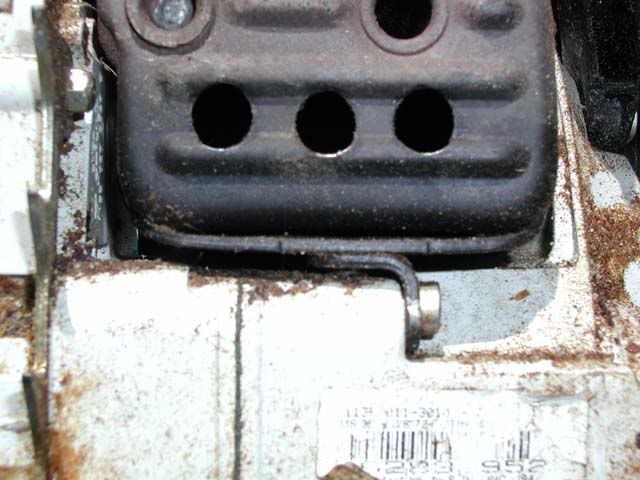
it is not sealed, just pull the 2 plugs out and there is 2 screws in behind the plugs that hold the muffler to the jug, take your back cover off and make your holes in it

Steve Connally
Been here much more than a while
- Location
- Suffolk, Virginia
I love my 361. Cuts like a champ. Little big for a bucking saw but it's all I use. I bought a 250 for a new groundie who was uncomfortable with the saw. The 361 is all you need.
As so far as the mods. How many holes and what size?
As so far as the mods. How many holes and what size?
- Location
- Overland Park, Kansas
w that much additional exhaust i would assume the carb would need re adjusted. Will it be a simple adjustment or would more need done?
- Location
- Simcoe , Ont.
Boy Bevis that looks pretty good , yes a little carb adjustment would be needed

- Location
- Home of the New Jersey Devils
For the ground work near the chipper and such, I like to have the MS 361c around. When someone releases the rear handle to work the chipper or move a branch the chain brake is activated. Really nice option.
I would also think that the new MS200T rear handle saw would be perfect for the limbing near a chipper. That is a really light high-output saw. I'm gonna try one soon!
I would also think that the new MS200T rear handle saw would be perfect for the limbing near a chipper. That is a really light high-output saw. I'm gonna try one soon!

- Location
- WA, but AK is home.
I've had one for a while now, and love it. It's man enough to handle light to medium timber, and light enough to carry all day long. I was going to buy an MS 260 to fill my "litte saw" niche, but the 361 is (to me at least) light and nimble enough to not need a smaller saw.
Open the muffler and it's a whole new saw.
Jeff
Open the muffler and it's a whole new saw.
Jeff
- Location
- WA, but AK is home.
And now you can get a factory style full wrap handlebar for them.
Soooo...how do I post a picture thereof?
Jeff
Soooo...how do I post a picture thereof?
Jeff
- Location
- Home of the New Jersey Devils
I agree. And, nice screen name! /forum/images/graemlins/cool.gif
- Location
- WA, but AK is home.
Thanks Mark.
So, can you tell me how to post a pic? Bevis managed it, and he's a stranger too, so maybe I'm just missing something.
Jeff
So, can you tell me how to post a pic? Bevis managed it, and he's a stranger too, so maybe I'm just missing something.
Jeff
- Location
- Home of the New Jersey Devils
If the pic is on your computer, then you simply click on the "Browse" button on the preview screen after you write the post. Then you have to find the pic on your computer and dbl click it. Then submit the post. If it's too large, then it will tell you that (and if the software doesn't Glen will! /forum/images/graemlins/grin.gif).
If you want it embedded like Bevis did, then you link to it on a website somewhere by clicking the "Image" botton on the Instant UBB Code box.(next to the smileys). There are other ways too, but these are the usual ways.
If you want it embedded like Bevis did, then you link to it on a website somewhere by clicking the "Image" botton on the Instant UBB Code box.(next to the smileys). There are other ways too, but these are the usual ways.

allmark
Participating member
just trying to post a pic myself
allmark
Participating member
Re: MS361 *DELETED*
Post deleted by allmark
Post deleted by allmark
allmark
Participating member
lets try another /forum/images/graemlins/confused.gif /forum/images/graemlins/confused.gif
allmark
Participating member
iguess i need to try something different later
allmark
Participating member
lets try somethingdifferent

- Location
- Ontario, Canada
New threads New posts
-
test
-
-

-

-
What's on your mind? TCI Magazine wants to know
- Started by Tree Care Industry Assoc.
- Replies: 25
-
 Apr 09 (Free CEUs) & May 07 - 'Urban Forestry Today' Webcasts @ Noon (Eastern)
- Started by UFT
- Replies: 0
-


