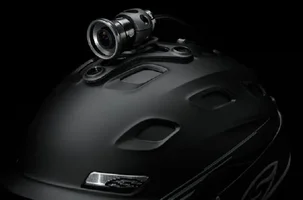
Go Pro or Contour Roam?

I'm thinking of getting a helmet camera and was curious which camera people like the most? It seems like the go pro and contour roam are some of the best from what I can tell. Is there a huge difference between the go pro 2 and the original? Can any be used as a typical camera on a tripod?
 
Here is a compilation of posts I made about the topic in another forum.

-----

The Go Pro HD Hero $299 is probably the 'best' camera, in terms of framerate and quality. The mounts are all top of helmet, which doesnt work for me, and it isnt as simple as other options.
http://www.amazon.com/GoPro-HD-HERO2...0188245&sr=8-1

The HD Drift $370, is another option that I dont know much about.
http://www.amazon.com/Drift-Definiti...0188174&sr=8-2

The Contour Roam $180, Is the camera I have. It has mounting options for side and top, which I like. There is a status button and a simple slider to power on and start recording.
http://www.amazon.com/ContourROAM-Ha...0188371&sr=8-1

The Drift and the GoPro both have screens, which is nice but its something to break. The Contour and the drift are waterproof, shockproof, etc. All 3 have additional cases you can purchase, affording additional water resistance and shock resistance. I know for a fact that there are a wide range of mounts available for the GoPro and the Contour and I assume the same is true for the Drift.

Time Lapse: The HD Hero does 2/5/10/30/and 60 second interval photos and the Contour will do 1/3/5/10/20/60 second intervals @ 5.0mp. Compiling the photos into timelapse is just a software thing. I use Picasa to turn the 1000 photo folders into clips, and then combine the clips into video with iMovie. I dont know if it is exclusive to the Contour but using interval photo it will take 1000 pictures in one folder than recycles the naming into a new folder. I am not sure about the Drifts timelapse capability. I know the Contour has a screw mount for a tripod which is what I use for timelapse.

Taking a still from the video is a matter of software but Google Picasa which is free can do that as can iMovie. That will work with either model.

The Contour software is ok, nothing special, necessary for changing settings which cant be done without computer to connect it to. As far as the GoPro or Drift software, i got nothing for you. I believe though that you can change the settings on both the GoPro and the Drift with the unit which is a plus but not a deal breaker for me. I don't really need to change settings a lot but it would be nice to switch from video to interval photo easier than having to connect the computer.

I got a promo code @ Amazon for the Contour it was 89ROAM89 I dont know if it still works but it was around Xmas and I got it for $89 (you guessed it!). For that price it was a great deal and I love it. I think its worth the $180 though for sure.

----

A few other notes.

All 3 models use MicroSD memory up to 32 GB aka up to $40-50 for the card alone. You will need at least a class 4 I believe but the better the card the better off you are. They go up to class 10.

The Drift and GoPro both have remotes available for controlling multiple cameras and starting/stopping recording and other functions. The Go Pro has wifi built in.(other contours offer this, with the ability to use a phone as a viewfinder.)

Contour offers several different models that have better tech specs but aren't waterproof and ruggedized.

Overall I still think the contour is the best choice for tree guys. Its the simplest, its rugged, least buttons, least to break, smallest, sleekest and cheapest.

----

The contours battery is internal and lasts about 4 hours, it cannot be replaced. Not sure about GoPro or Drift batteries.

1080p is about 8 minutes/gb so a 32gb card is about 240 mins or 4 hours. The memory card @ 32gb fits the battery life pretty well.

The contour only has one button that provides a tactile feel as to whether it is or isnt recording, its a big clunky slide switch, perfect i think.

-----

Of course there are also the pricier VIO POV models but I have no knowledge of those.

 
The Go Pro seems to capture great vids, but it sticks out of your helmet like a sore thumb. In this biz that's very bad, as it's bound to get tangled up in stuff. In my opinion that can be down right dangerous for you as a climber.

The Contour Roam with a side mount on your helmet is a far more sleeker less obtrusive setup in this biz IMHO.

Safety first!

jomoco
 
GoPros on a helmet would be a PITA for sure. I really like the VIO POV for this reason.

They also have may other benefits that GoPro doesn't offer.

http://www.vio-pov.com/products-all/pov-hd.html

315039-VIO.jpg
 

Attachments

  • 315039-VIO.webp
    315039-VIO.webp
    11.6 KB · Views: 29
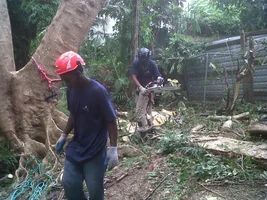
Used the contour roam ( belongs to another tree company friend ) to test it for him. It is rugged easy to use and the lens gives a fairly accurate video of the actual job, little or no distortion of the 3D workspace. Second the easy on off slide button, and being that it was nicely mounted on the side of my Kask which had clips to hold the elastic strap it remained very stable. It was used on a very difficult removal with a lot of tedious climbing and hairy branch structure. I still have 4 hrs of video and can't get around to editing it. Wished I had used it on the second day when I was dealing with the spars. I will say that this camera is reasonable and good enough for me ( can use it anytime ). I am not a tech guy but I can handle myself around electronics, I am more of a jack of all trades. My $.02 as usual. I like to get in the do as I am not shy. See the camera in this pic. Don't study the fence as all that was being changed ( ha I know some smart azz will see that so I am getting that out the way early I am a vet at posting pics now heavy scrutiny ).
smile.gif
 

Attachments

  • 315040-IMG01738-20120114-1511.webp
    315040-IMG01738-20120114-1511.webp
    525.9 KB · Views: 83
The Go Pro has a chest mount that I find to be comfortable, compact and fairly streamline while still giving you a decent POV perspective. I like it better then the helmet mount since I don't have the added weight and bulk on my head. The only disadvantage is it doesn't follow where you are looking like the helmet mount. But with 170 degree wide angle it still captures the majority of the action
I have found the battery to last about 4 hours and there is a an add on to double the battery life.
I linked the chest mount so you can get an idea of how it fits.

http://gopro.com/camera-mounts/chest-mount-harness/
 
I got the Vio and like it alot. Only dis is the body is kinda large which hangs around my neck. Apparently there is a chest harness which would be comfy but just tuck it into my shirt and I would wear two. Wrist remote is nice. Will be using it more this year. Runs on 4 AA batteries and comes with different mounting options.
 
My youtube shows Walter stump, Crane removal with New crane guy, McCain removal, one hour tree removal were all shot with the head cam.
 
Got a GoPro Hero HD to use at my leisure, so this week I will use it on one of the jobs I am doing and see how well it performs compared to the contour. The editing is a bitch for me as I don't have much patience for such things I might get one of these young hotshots I know to give me a hand.
 
go pro does NOT get in the way!

unless you film trimming or something.

plus, so many mounting options.

I mounted them on my spurs, on the crane ball, on the crane boom, on a truck, on helmets, on a bridge, strapped to a limb, used them underwater on vacation and also put one on a long aluminum stick and used it underwater in my pond filming fish and turtles underwater.

Price you showed is wrong for the orig go pro I think, it's gone WAY DOWN. Got my last one for $119.00 at PepBoys.

I would like to have the HD one though. Got two of the originals.

I hear you can buy two and a special mount and softwear and make films in 3D. I said this before and no one cared. Odd.

I don't think Go Pro pays people to promote their use and that is why you see them . People buy them. Submit a cool video to go pro, if it's really good, go pro might pay them to show the video.

Love my Go Pros.

I'm sure others are good too.
 
I have had a contour for about three years. I just recently replace my first one with a new GPS version.

The new one has more settings. The video was filmed using the Tall 960hd setting. It provides a standard aspect ration of 4:3, not wide screen. Some of the other settings are wide screen including 1080 hd, but the field of view is smaller 115º I think.

All in all it shows a realistic view of what I see. I like it. Small and side mounted I seem to run it into things less than when it is mounted on top of my helmet.

With the Tall setting it shows what my hands are doing without the extreme fisheye effect of a full some other cameras.

Here is the link:

http://www.youtube.com/watch?v=e4A4F-9WW...PxilPzJIXhCGzw=

Tony
 
[ QUOTE ]
Here is a compilation of posts I made about the topic in another forum...........
1080p is about 8 minutes/gb so a 32gb card is about 240 mins or 4 hours. The memory card @ 32gb fits the battery life pretty well.


[/ QUOTE ]

Thanks for this very informative post. I can see right now I need a bigger sd card.
I just got a GoPro and I am having trouble getting it to connect with my phone over WiFi to use the GoPro App . The app looks cool in that I can control all the camera functions from my phone and also view the video, all from a few hundred feet away. Now if I just had a good subject to film doing some amazing stuff.......
Questions:
I can't get past the password logon and they say the default is goprohero but it is not working for me.
Anyone with suggestions?
Also suggestions on using it, mounting etc would be greatly appreciated.


Thanks
 
[ QUOTE ]
I have the contour but am going to get a gopro on the suggestion of my sister n law who works in the film industry.

[/ QUOTE ]
I just got the Hero 3 yesterday and I'm playing with it now. I had to do another firmware update to get the WiFi to connect. I have the app on my phone and it is going to be awesome using this. The little LCD screen on the camera is a pain, so doing it all on the phone will be great. Also it looks like I will be able to look at my phone to see what is being filmed from the top of my helmet. I'm liking this so far! Still wish I could do amazing things though.

Loving the APP!!!!!!!! For example, setting the date and time took a little effort using the LCD screen on the GoPro, scrolling, selecting etc. etc. Using the APP, one push! done.
with and 8 gig card I have 1:19 minutes of record time and 1253 photos remaining with the current settings. Everything is settable and VIEWABLE on my iPhone screen. SO COOL.
 

New threads New posts

Back
Top Bottom