Jobber Software

Alright- I spent many hours putzing around on jobber over the weekend. I have a few questions. Some are regarding usability problems and some are feature requests.

Jobber Questions

1- How do I attach other PDFs when estimates go out?

2- Can there be estimate versions? Lets say I send out a proposal with 20 items. Client calls back and accepts 10 of them. I open the app, delete the ten they don't want, then resend it. They call back and say they decided they want to add back 5 that were deleted. Now I have to open the email I originally sent, then re add the original items. I need to be able to open the proposal, click "create new version" and make my changes without messing up the original.

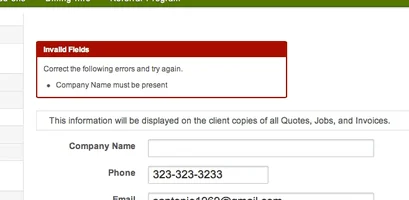
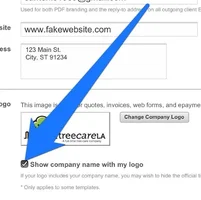
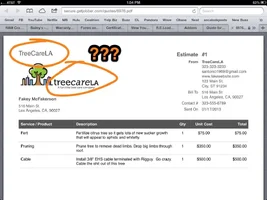
2- Can you take the company name OFF the email? My company name is already on my logo. It looks redundant. See the attached pic

3- When sending an estimate, if I need to make changes to the email draft. You can't scroll easy on the ipad. It keeps correcting our scroll and its annoying and near impossible to select something to change it. Give it a shot. You'll see what I mean.

4- When converting an invoice to a job you click the date to schedule it. But there is no way to tell if a day is available or not. How do you avoid double booking?

5- How do you get rid of "Delivered by Jobber Copyright © 2013, Octopusapp, Inc." on the emails that get sent out?

6- How about a Work Order button that shows items and descriptions from and estimate, but no prices? Can that be done for the crew?

7- I see you have Quickbooks online syncing as an add on. Can you also have Wave syncing, too?
 

Attachments

  • 351068-image.webp
    351068-image.webp
    65.3 KB · Views: 72
Thanks for the questions NickfromWI!

1) We have a feature in the pipeline called "Document Management" which will do exactly this. You'll be able to upload and store files (PDFs, images, etc...) that you use frequently, and have the ability to attach them to Quotes and Invoices that Jobber sends for you. For the time being you would need to simply send additional files separately, or download the PDF version of your Quote/Estimate or Invoice and send all your files together.

2) There are no estimate versions as you've described, however you can create as many quotes as you like for a client, archiving the ones that you don't need, and then opening them again if it turns out you *do* need it. We have plans to provide a 'Copy Quote' feature that will allow you to easily copy a quote so that changes can be made. It sounds like the best work flow here though would be to simply create a Job based off the Quote, and remove the line items from the Job that the customer decided they didn't want. That way the Job is always connected to the original Quote, but only reflects the work that was chosen. If the customer changes their mind again you can either add line items to the Job to bring it up to date, or delete the Job and create a new one based on the original Quote which will then have all the line items on it again.

3) We'll look into this right away. Because tablets use touch as the primary form of navigation it can be really difficult to provide good scrolling and data input. We're constantly improving and working on better ways of doing this, so thanks for the heads up on this one.

4) This is one work flow that will be improved with an upcoming improvement to the scheduling area. In this particular situation you would need to check in the calendar for an open spot first before scheduling. There are many other ways to schedule jobs in Jobber, including directly from the month/week view and grid/map view, where you can better see the context of your scheduling — of course the problem being that you can't then create the Job based off of a Quote.

5) The email delivery attribution is actually required by law in many jurisdictions for spam compliance. Automated e-mails must include a means to contact the sender and request removal from their "distribution list". This little by-line is the least invasive approach we can currently take.

6) We have plans to introduce a new permissions setting that will hide all pricing information from your users, regardless of their other permissions settings. It is currently possible to hide all pricing by restricting permissions such that employees only see their scheduled tasks with the ability to mark them complete, however they of course can't generate invoices or modify Job information with those restrictive permissions (which would show pricing info).

7) We have no concrete plans to sync with Wave at the moment. To be honest, with the recent release of Expense Tracking in Jobber, we have all the basic accounting functionality that Wave does, and we have plans to continue building out that area of the software.

I hope that helps answer your questions! If anyone wants to get in touch don't hesitate to e-mail us at info@getjobber.com with questions or for help getting set up with an account.

Cheers,
Sam @Jobber
 
Oh sorry about that - missed that one question. Yes, you can absolutely remove the company name from your Quotes and Invoices for situations where your logo includes your company name. The option is available in your company settings in the same area as where you upload your logo.

Thanks also for the video bug report! That's a great way to show exactly what you're talking about, and helps a lot. We'll have a look on our end and see what we can do about this.

Cheers,
Sam @Jobber
 
Don't be making fun of Mr. McFakerson! He's one of our best clients!

Thanks Mangoes- I'll check it out.

And thanks Jobber. I'll go take a closer look at the settings right now.
 
NickfromWI: Why don't you get in touch with our support help desk to help point you in the right direction. It's really easy for us to miss posts in these forums, and it's not a very good way to provide quality support.

You can either e-mail us at support@getjobber.com or open a ticket from right inside your account.

Cheers,
Sam @Jobber
 
Hey Nick I'm just wondering as I am trying out jobber, what are some of the preset services that you use to make data entry easier? I'm just wondering how you format your quotes I guess.
 
I can't remember Nick, did you ever decide to go with Jobber over Routzy, and why? I'm testing it out and it's got a lot of good stuff, some potential, and some places to improve. I've been sending support questions/suggestions.

1) One big issue for me is not being able to track taxes by jurisdiction. In quickbooks I use tax groups, and it summarizes it too for when I have to pay at the end of the year. As Jobber is I would have to double enter my invoice totals at minimum. Part of that issue is that I use Mac, and quickbooks doesn't sync on Mac. It's possible that a windows version would integrate and at least copy the invoice in, even if I had to clarify the tax group.

2) Keeping the contacts synced with a group in google/icloud seems like a no brainer.

3) Oh, I had an issue on an estimate with a really long note/contract area. It splits it at the same horizontal line as the bottom of the total box, and then starts on a new page. This could be a little confusing for a customer if they're just looking at a PDF, and miss the rest of the notes/terms. Sam said something about working on that one.

4) Depending on the situation/client I might give an estimate or a bid/quote. It would be nice to have a drop down option on the "create quote" page to select which one. There could just be duplicate configuration pages in the settings, so that we could change the wording in any applicable communication templates.

hmm, I think that's it for now. I would be stoked to see these things implemented.

Sam did say they don't want to make "knee jerk" alterations to the program because they want to make sure it is stable, and keep bugs to a minimum.
 
I wish Jobber had categories of service. In service ceo i have one entry for Pruning with a drop down box for , ornamental, structure, crown raising, endweight reduction, etc etc. it makes it really easy to build a quote and you dont have to scroll through so much.
 
[ QUOTE ]

I wish Jobber had categories of service. In service ceo i have one entry for Pruning with a drop down box for , ornamental, structure, crown raising, endweight reduction, etc etc. it makes it really easy to build a quote and you dont have to scroll through so much.

[/ QUOTE ]

That would be a good format too.

In retrospect, I think I can't adopt Jobber or anything like it unless there is a solution for the Tax jurisdictions. It defeats the whole ability to be able to send an invoice out from the software if I have to make a duplicate invoice somewhere else for book keeping.
 

New threads New posts

Kask Stihl NORTHEASTERN Arborists Wesspur TreeStuff.com Teufelberger Westminster X-Rigging Teufelberger
Back
Top Bottom