
treebing
Been here much more than a while
- Location
- Detroit, Mi.
The beasthorn and natural redirects are pretty much all I ever use. Occasionally a sling with a biner.

Follow along with the video below to see how to install our site as a web app on your home screen.
Note: This feature may not be available in some browsers.


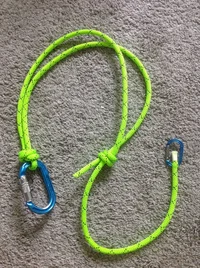
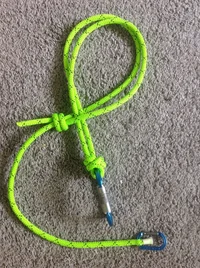
I need to make a better video but this redirect is so so awesome. Totally retrievable. Load sharing. Awesome awesome.
So I will edit my video to give it the correct name! But thanks again for turning me on to it. The main advantage it seems to have over most of the others out there is that it only takes 2x the length of rope to retrieve the redirect. My only complaint is that it sometimes gets pretty tight and you really have to jerk on it to get the clove hitch to release.. This is a misnomer as I have done nothing but evangelize this redirect. But Eric does a good demonstration.

Talking about doing it from a phone.@Mowerr; My method for posting a link to a web page is to go to the top of the page I'm on and right click on the address bar, if you know what that is. It's the line at the top of the page that shows your current location on the internet. Once I right click with my mouse, I get a "drop-down" menu of choices, one of which is "Copy". I would then "Left click" on the word "Copy". After that I put the cursor into the post where I want the link to appear, and do a "Right click" again. This would again give me a "drop-down" menu of choices, one of which is "Paste". I would "Left click" on the choice "Paste", and it would place the string of characters that I'd copied from the address bar into my post. If you do a preview of your post at that point, you should see an active link.
Actually, though, the folks who run this forum have things so slicked up, that instead of getting just an active link to another web page, you end up seeing an image of the actual video with all of its controls enabled. So they've done some coding magic in the background to make all of that happen.
I hope some of this makes sense. Thanks for listening.
Tim
P.S. Here is my attempt to post a link to the video I think you are referencing.
Same process using an Iphone.Talking about doing it from a phone.
I know how to on a desktop. Thanks
I don't have a mouse to right click with on my phone, and I don't have an iPhone....besides I don't really care dude.Same process basically!The BuzzBoard
TreeBuzz.com is a forum designed to unite tree climbers and arborists from around the world with the hope to share current information and exchange ideas to help increase safety, efficiency and professionalism in real time.www.treebuzz.com
Same process using an Iphone.

To right click on a phone just press and hold what you want to click, options will come up.Ya
I don't have a mouse to right click with on my phone, and I don't have an iPhone....besides I don't really care dude.
You guys knew what i was talking about and somebody posted it already.


