Quickbooks online... Why isn't everyone using it?

tomthetreeman

Participating member
Location
Rhode Island
im looking to upgrade from our current estimating/invoicing software... It looks like QBO does almost everything I need. Anyone else using it? Here's what we currently do and what I'd like from QBO:

Client calls, gets entered in iOS contacts (this is really helpful)

Estimate list is generated for me by office manager.

Site visit, estimate is generated on site on iPad, shared with entire group with current app.

Job is scheduled (current app doesn't do this).

Job is completed, invoice generated.

Paid invoice is generated upon cleared payment, added to reports.

Reports are forwarded to book keeper, added to quickbooks.

Any thoughts on on how QBO will make this easier and more streamlined for me? I'm wondering about the iPad features as well as the integration of iOS contacts. Thanks!

Tom
 
Its a good place to start if you are using quickbooks. I started doing everything out of quickbooks. The problem is you can't schedule out of it or generate renewals. If you could get an add on to do all that you would be golden. I think simplicity is the key with software. Im not that tech savvy.
 
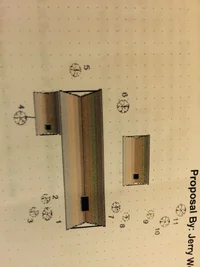
What I dont like about either of those is you cant draw a property diagram on the estimates . I like to have a diagram of the property, house, trees location on the property , makes it a lot easier for the crews and less guess work.
 
i use spatial reference for every line item. it works very well for 90 percent of my properties.
per instance
"Maple @ back right of house,
or
Oak @ left rear of property,
or Catalpa @ front center of property,

usually iding the species and the proximity is all you need.
 
We probably wouldnt like our work orders or the sales guy without Diagrams , especially on properties with lots of trees and specific work on each
 

Attachments

  • image1.webp
    image1.webp
    225.8 KB · Views: 52
We probably wouldnt like our work orders or the sales guy without Diagrams , especially on properties with lots of trees and specific work on each

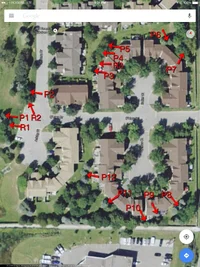
Super easy to do with Jobber.

1. Screenshot Google Map aerial view
2. Annotate screenshot image
3. Attach image to quote

We've attached >20 images to Quotes. Aerial image plus specimen images. Can also annotate for specific branch removal, stump location etc. these can be sent to client for their reference as well.
 
I would like to see an ezample if you have one Mangoes , we do a diagram for just about every job and that sounds pretty cool.
 
But if its google maps wouldn't there be trees in the picture that have been removed already or trees that where planted that are not in the picture ?
 
I don't use QBO because it won't track multiple risk classes /employee for state workers comp as Washington state requires.

I had to buy QuickBooks for windows and install Windows on my Mac to get it going. Originally when we started we just used max QuickBooks and payroll online, but it isn't as capable.
 

New threads New posts

Back
Top Bottom