
Finding Your Way Around:

John_KAYS

Carpal tunnel level member
Location
Eastern PA
I thought we could help each other out by pointing out handy, time saving, hidden, sweet, useful features or highlights that we have stumbled onto.

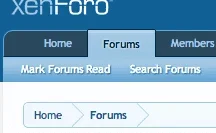
The one that I just found was the "Mark Forums Read" tab.
Presto I don't have to go through everything again.
I know it's obvious, but if you hadn't seen it there yet...you're welcome.

I am really enjoying the new interface, but I am feeling a little home sick.
 

Attachments
  • Screen Shot 2014-04-01 at 7.20.45 PM.webp
    Screen Shot 2014-04-01 at 7.20.45 PM.webp
    4.3 KB · Views: 7
Last edited:
As you log into the new site everything will be new...including all the old posts.
To rectify this - i.e. set all the previously read posts back in their place - all you need to do is find the "Mark Forums Read".

Now to do that:
Up in the top left of the page you will see the tabs - Home/Forums/Members
Click on the Forums and in the light blue list directly below you should see:
If you click on the Mark Forums Read it will ask you "Are you sure you want to mark all forums read?"

And there you have it.

PS: In doing this you will of course set all of the posts in every forum to "read". If this is not your intention then I wouldn't recommend. And be alert to the posts in the "no man's land" that are newer than old if you get what I am saying...The train keeps moving.
 
Last edited:
This is pretty cool:
Members > Recent Activity

Recent Activity
Activity stream for all registered members at Tree Buzz.

It shows you the most recent posts: Tells you who, what, where, when!
 
Here's how to find those old threads or posts that might seem lost right now:
  • Click your screen name
  • Click "profile page"
  • Click the "information" tab
Under "Interact":
  • Click "Find all content by 'your screen name'..."
  • OR click "Find all threads by 'your screen name'..."
 
That's really useful. I'm finding the new Buzz has much more capability for search and archives and just locating things in general....once you get used to it and know where things are. (: Thanks for pointing that out TreeLogic.
 
Ya'll have seen this?
But who's counting right?

Can 250 of you like this for me, and while you're at it can 250 more of you like it? Yeah, that would be great. Thanks!

Trophies
  1. 1
    First Message
    Post a message somewhere on the site to receive this.

  2. 2
    Somebody Likes You
    Somebody out there liked one of your messages. Keep posting like that for more!

  3. 5
    Keeps Coming Back
    30 messages posted. You must like it here!

  4. 10
    Can't Stop!
    You've posted 100 messages. I hope this took you more than a day!

  5. 10
    I Like It a Lot
    Your messages have been liked 25 times.

  6. 15
    Seriously Likeable!
    Content you have posted has attracted 100 likes.

  7. 20
    Addicted
    1,000 messages? Impressive!

  8. 20
    Can't Get Enough of Your Stuff
    Your content has been liked 250 times.

  9. 30
    I LOVE IT!
    Content you have posted has attracted 500 likes.
 
So the little pair of glasses means you're watching that thread and receiving alerts, right?
And your little avatar pinned onto the original poster's avatar means that you have posted in that thread, I think, but only accounts for your posts 'post' renovation.

And Rich, I wish! The most depressing factor in tree work is that I don't have enough $ to get all of the fun toys I want, when I want. My wish list at Tree Stuff keeps getting longer and longer, but it doesn't seem to be getting any shorter off the other end. :(
 
To preview your post:

In normal post box, bottom right, choose "More Options"...

In the following screen is a button to preview post so you can see what it will look like when posted.
 
To preview your post:

In normal post box, bottom right, choose "More Options"...

In the following screen is a button to preview post so you can see what it will look like when posted.

I was looking for that. Thanks. I have just been editing mine regularly after I post it. This is better!
 

New threads New posts

Back
Top Bottom