Mobile app for creating invoices and proposals?

chiselbit

Been here a while
Let me start this with the disclaimer: I am not good with computers. I can barely navigate this website and you guys have seen me struggle to post pictures. So with that said I am looking for a way to create invoices and proposals with my iPhone. I’m not too interested in accepting credit card payments, I suppose it wouldn’t be a bad thing but it’s certainly not necessary. what’s out there for a neanderthal like me? I see several in the App Store but being the suspicious/ superstitious computer hater that I am I’m reluctant to just blindly try one. Anybody using something simple?
 
Joist is pretty easy, has/had a free version and accepting cc is as easy as clicking one button. Customer inputs their card for payment on their end.


You can save line items "tree removal " "haul brush" then just click the needed items when building a quote, so no repeated typing
 
I've used Jobber for 6+ years.

Your accountant and/ or admin staff can have access if you want.

It's designed around easy use.

I got an included, one- hour training by phone. Their is tech support. I don't need the tech support. It's easy.

Check the getjobber.com site for better info and current pricing.

More than I want to pay, but it saves me a lot of time and effort over paper.

Send correspondence by text or email.

Accepts CCs.
 
I also use Jobber. Also cringe a little at the price. But it makes life easier...way easier.

I don't like the app. I just have a link to the website on my home screen. I've gotten WAY more efficient at quoting and billing. Honestly, previously unsent bills probably pay for Jobber.

Since he suggested it first, I'll tell you to get a referral code for @southsoundtree and you'll both get a month or two free. Yours is a trial. If you subscribe after that, he'll get the freebie.
 
I use QuickBooks for now. It works. I don't like everything about it but since my accountant uses it and I do my own books it works out. At some point I'll need to scale to a proper CRM, but not today.

Does Jobber allow for route optimization?
 
I'm sure Jobber and quick books is popular for a reason, (I haven't tried them) but in demos they look very similar to what I use at a much higher rate.

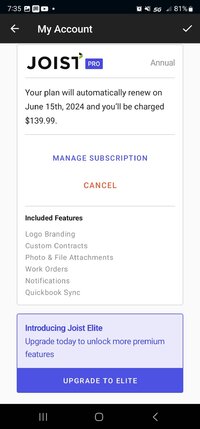
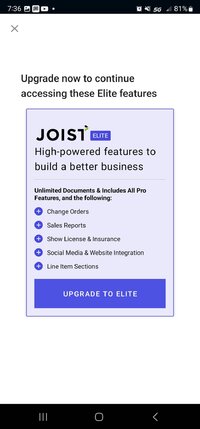
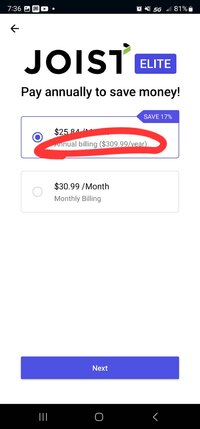
Clicking on the link above, jobber charges $170/month for the mid range plan where joist charges $140/year and maxes out at $310/year for the higher end program.

Am I missing out on features that they offer? I included screenshots that have Joist's features listed. I believe joist has a free platform as well, at least it did when I first signed up. Free platform was pretty generic, no logo on the letter head, no alerts when someone opens a quote/invoice...
 

Attachments

  • Screenshot_20240423_073215_Samsung Internet.jpg
    Screenshot_20240423_073215_Samsung Internet.jpg
    173.7 KB · Views: 9
  • Screenshot_20240423_073541_Joist.jpg
    Screenshot_20240423_073541_Joist.jpg
    123.2 KB · Views: 10
  • Screenshot_20240423_073607_Joist.jpg
    Screenshot_20240423_073607_Joist.jpg
    115.7 KB · Views: 8
  • Screenshot_20240423_073616_Joist.jpg
    Screenshot_20240423_073616_Joist.jpg
    86.1 KB · Views: 9
It was several years ago that I did trials of several options and settled on Jobber. I think Joist was one of those. I know ArborStar, Single Opps, and Gorilla Desk were on the list.

It's been 4 years and I don't remember the details but settled on Jobber. It's not perfect, but it's good enough I don't keep looking.
 
I also use joist - going on three years now. Im happy with it, but it's not perfect. I only run one crew and I do all the admin plus being in the field. The cost of jobber and single ops is too much for a smaller business IMO but anyone running multiple crews would probably get better service from jobber etc.

I'm not super tech savvy and find joist relatively easy to use.
 
I also use joist - going on three years now. Im happy with it, but it's not perfect. I only run one crew and I do all the admin plus being in the field. The cost of jobber and single ops is too much for a smaller business IMO but anyone running multiple crews would probably get better service from jobber etc.

I'm not super tech savvy and find joist relatively easy to use.
Between Joist, Jobber and QuickBooks, Joist is a better option for less technically savvy folks. I found Joist incredibly easy to use when I had that. There’s just a lot less you can do with it vs Jobber. Jobber is awesome when you start running multiple crews, doing time sheets, tracking profit margins, and all that fun stuff but if sounds like the OP doesn’t need that kinda thing right now.

QuickBooks is not an intuitive platform for estimates IMHO.
 
One issue with provider apps is emailed invoices getting flagged as junk.
I use to take notes and type them up on a doc send from my email to theirs, yet this required manually entering them into accounting software (or paying for someone to do it).
I tried Quickbooks online and it was cleaner, yet 50% of emailed quotes never were received and this was a huge headache.
Switched to Jobber, and it does take a bit to get use to it. It’s set up more for mowing companies or those who have pre set rates for specific tasks. The estimates would then be ‘units’…. Aka I think the job is going to take 8 hours so I enter 8 units at X billing rate = cost billed. I habitually ignore that and set up a day rate price, or will just enter in the amount I want for the job.
I pay for the expensive version and there are some cool bells and whistles EXEPT that all emails sent through Jobber are from “your company name” notifications@getjobber.com vs your email address. Thus many do still get flagged as spam, so it does take some hand holding followups.
Jobber does quite a bit more, and I do think of it as a second person helping me out. It’s much cheaper than hiring a real person…. I still don’t feel I ‘need’ the expense but I think of it like a tool that does save time.
The app still needs work, and in my area 25% of the time I’m out of cell service, so I still take notes and photos (which are processed into a estimate and sent out later).. Those more tech savvy with better service can write the quote on site, and the phone over to have the client sign on the spot. I would never operate that way but it would be handy for those who do.

 
...The estimates would then be ‘units’…. Aka I think the job is going to take 8 hours so I enter 8 units at X billing rate = cost billed. I habitually ignore that and set up a day rate price, or will just enter in the amount I want for the job.
...
I almost always just leave it as 1 "unit" and quote the price for the tree. So my estimate for pruning multiple trees would have, maybe 1 tree pruning (tree location and details of pruning details in job description) for $xyz, then another line item with the next tree described, etc...

Exceptions I can think of include:
*Where multiple applications are done, then I'll price per application.
*Some trees are charged at price per inch of DBH (when treating EAB for example), so I have inches in units and a note at the bottom of description "(priced per inch of trunk diameter)"
*If bidding a larger collection of city trees for young tree training/structural pruning. I'll usually average those and list as price per tree and number of trees.
*Planting - if more than one of the same kind and size

And yes...spam filters don't like Jobber. Its odd though, several clients get the invoice past due notice, but not the original invoice. And I know its not people just making excuses for late payment! It happens too often and to people I know well enough to know they are telling the truth. When that happens, I just adjust the invoice from net 30 to net 45 ad tell them I did that so they won't get another late notice unless they don't send payment.
 
Aka I think the job is going to take 8 hours so I enter 8 units at X billing rate = cost billed. I habitually ignore that and set up a day rate price, or will just enter in the amount I want for the job.
This can be be a helpful thing to use for two reasons.

You can track your profitability by seeing how many hours you had on a project and how many hours the crew spent to do a project.

It also indicates to the crew how long you expected the job to take, which can say a lot especially in terms of a prune that could conceivably take 2 hours or 6 hours depending on level of focus.
 
This can be be a helpful thing to use for two reasons.

You can track your profitability by seeing how many hours you had on a project and how many hours the crew spent to do a project.

It also indicates to the crew how long you expected the job to take, which can say a lot especially in terms of a prune that could conceivably take 2 hours or 6 hours depending on level of focus.
I can totally see how it is useful. I typically type this up in ‘internal notes’ and once the quote is approved and transferred to a ‘job’ will write this in the title and description of the job.
Most all the time I’m on the job, even if it’s only to line out the crew in the morning. If I fail to make these notes I can tell how long I intended the job to take by the price. The bigger jobs with a little cushion I typically will have it in my memory.

I’d love to have the patience to go through all my line items and enter in a fixed price per unit. Memorize it and plug in units per tree as separate line items. Just haven’t been able to adjust to that model and look at the project as a whole. Itemized quotes can go both ways if the client expects they can pick and choose whittling it down to a cheap non profitable thing. Then your left with setup tear down and travel.

I will do optional line items for hauling wood, chips etc.
 
I'm trying to adjust to this too. I have to be on site to line the guys out, but in the future I want my WO to have what they need to do the job, I.E time and scope sufficient to complete the job. It's a pain to do on QB since it's accounting software and it always has money on it, which I then sharpie out.

Has anyone used FieldAware? I couldn't find anything on estimates, but it does invoicing and team management. TCIA discounts too.
 
On Jobber, you can limit who sees what. Each employee can have access and you limit what they can see and do. You can make internal notes, so I assume that's where you could put expected time. I haven't used those features.

 

New threads New posts

Kask Stihl NORTHEASTERN Arborists Wesspur TreeStuff.com Teufelberger Westminster X-Rigging Teufelberger
Back
Top Bottom