Mind hive brainstorm. Safety and equipment check lists

evo

Been here much more than a while
Location
My Island, WA
As a user of Jobber, I have the ability to create job forms. Basically customizable user input fields, I really wish there were some pre-built templates, but there isn't. I've sat down to do this a few times now, but always come across with a block. The block is wanting to keep it simple and not bulky so its actually used and implemented. Nearly every time I sit down to do this, I make it way over complicated.

I can use drop down menus, check lists, true/false check boxes, long or short answer boxes

So what I want to do, is make three forms for the employees to fill out daily.

Equipment maintenance check list: (such as)

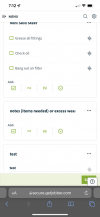
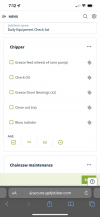
Grease Chipper

Service chainsaws --->
Clutch cover
Air filter

Safety Check List:

Trailer/chipper properly hooked up to truck

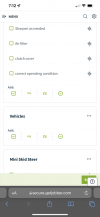
Mini Skid secured and chained

Job Site;

Electrical hazard

Drop zone obstructions

Cones needed/used

Pre-Climb inspection (if needed)
1)
2)
3)


Job Notes/Observations:

This would be viewable to the client, essentially notes on the job and observations such as "Cherry tree in back yard has a cracked leader"
 
I’ve never used Jobber myself but have seen some of you guy’s on here mention it.

Sounds like an interesting idea.

I would add on the forms you are going to have the employees fill out, have them sign and date the form as well...maybe even include time?

That way if there is any confusion or issues, you know who signed off on what etc.
 
Not sure if it's an option in jobber, but we are looking at some fleet maintenance tracking software and they give you the option to force a picture to be taken and uploaded before it'll let you move on to the next item (some of them even have some fancy object detection software that can verify if headlights are working, input the mileage from an odometer picture etc) which can help with enforcing compliance early on and then can be rolled back to something a bit less time consuming once the employees have gotten in the habit of doing the checks.

As for job notes I would assume something along the lines of a normal Jobsite Safety Analysis form would probably be sufficient. Something like note hazards (with check boxes for common ones) customer notes if they come out and talk to the crew, and maybe a before and after photo
 
Not sure if it's an option in jobber, but we are looking at some fleet maintenance tracking software and they give you the option to force a picture to be taken and uploaded before it'll let you move on to the next item (some of them even have some fancy object detection software that can verify if headlights are working, input the mileage from an odometer picture etc) which can help with enforcing compliance early on and then can be rolled back to something a bit less time consuming once the employees have gotten in the habit of doing the checks.

As for job notes I would assume something along the lines of a normal Jobsite Safety Analysis form would probably be sufficient. Something like note hazards (with check boxes for common ones) customer notes if they come out and talk to the crew, and maybe a before and after photo
That sounds way too complex for what I’m after. I wish there was more of a middle ground, photos aren’t a option. I’m sure there is some metadata of who closed out the job aka filled out the form, but no signature option. Here’s a sample of D28FC34A-FF4F-4664-8FB8-A11FE06B4295.pngAD04CCFE-B514-4978-9E11-466910CF322D.png7F0050F5-BCDA-4E45-93E5-5973D194FEEC.pngwhat I got so far. Really trying to keep it user simple
@climbingmonkey24
 
Maybe check tire pressure too? Definitely something that can get tickets and fines.
Keep a cheap gauge in the glove boxes.
 

New threads New posts

Back
Top Bottom